
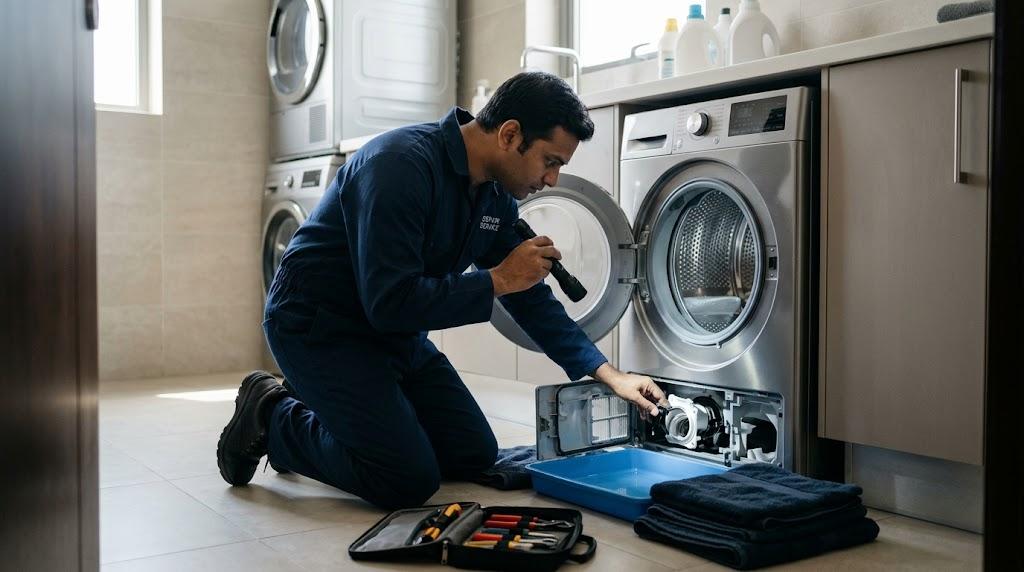
You open your washing machine after a cycle and find your clothes sitting in a pool of water. The drum may be full, the laundry may still be soaking wet, or the machine may stop before reaching the spin cycle. If your washing machine is not draining water in Dubai, the cause could be a clogged filter, a blocked drain hose, a faulty pump, or a problem with your household drainage.
Some drainage issues are simple to check, but others require technical repairs. Finding the cause early can help prevent unpleasant odors, interrupted laundry cycles, and further damage to the appliance. Before calling a technician, learn what might be stopping the water from draining and which checks you can safely perform at home.
Why Is Your Washing Machine Not Draining?
A washing machine removes dirty water through a drain pump, filter, and outlet hose. If any part of this system becomes blocked or stops working, water may remain inside the drum after the cycle ends.
Check for a Blocked Drain Hose
A drain hose that is bent, twisted, crushed, or obstructed can prevent wastewater from leaving the machine. Check the visible section of the hose and make sure it follows the installation instructions in your appliance manual.
Avoid pulling the hose forcefully or disconnecting it while the drum contains water. If the hose appears clear but the machine still cannot drain, the problem may involve the pump, filter, or household drain.
Look for a Clogged Drain Filter
Many washing machines have a drain filter that catches lint, hair, coins, and other small objects before they reach the pump. Over time, these materials can restrict water flow and interrupt the drain cycle.
A clogged drain filter may cause slow drainage, standing water, or an error message. If your model has an accessible filter, follow the manufacturer's cleaning instructions. Switch off and unplug the appliance first, allow hot water to cool, and prepare towels and a shallow container to collect any trapped water.
Check the Household Drain
Sometimes the washing machine works correctly, but the plumbing connection cannot carry wastewater away. A blocked standpipe or household drain can cause water to back up or drain very slowly.
If you notice water backing up from the drain connection or similar problems with nearby fixtures, the plumbing may need attention. Avoid running repeated wash cycles until the drainage issue has been checked.
What Does Standing Water Inside the Washer Mean?
Finding washing machine standing water after a cycle usually means the appliance has not completed its drainage process. The reason could be a blockage, a pump problem, or an interrupted cycle.
The Drain Pump May Be Blocked
The drain pump pushes wastewater out of the machine. Small objects such as buttons, lint, and loose debris can obstruct the pump or its impeller, reducing its ability to move water.
A washing machine drain pump blockage may cause a humming sound without effective drainage, although a faulty pump or electrical issue can produce similar symptoms. Do not reach inside the pump or attempt to remove an obstruction while the machine is connected to power. If cleaning the accessible filter does not resolve the problem, arrange a technical inspection.
The Pump May Have Failed
A drain pump can wear out over time or stop working because of electrical or mechanical damage. You might hear no pump sound at all, or the machine may make a humming noise while the water level remains unchanged.
These symptoms alone cannot confirm pump failure. A technician can check the pump, wiring, and related components to determine whether the pump needs cleaning, repair, or replacement.
The Cycle May Have Stopped Early
A power interruption, an error condition, or a selected program may prevent the washer from completing its drain cycle. Check the display for error codes and consult the user manual to understand what they mean.
If the machine stopped because of a temporary interruption, follow the manufacturer's instructions before restarting it. If the same problem occurs repeatedly, further diagnosis may be necessary.
How to Fix a Washer That Won't Drain
When a washer won't drain, start with basic checks that do not require opening electrical compartments or dismantling the appliance. Always follow the manufacturer's instructions, and stop if you encounter trapped water that you cannot release safely.
Remove Laundry and Check the Drain Filter
If the door unlocks safely and the water level allows access, remove the laundry and set it aside. Follow the manual to drain any remaining water and clean the accessible filter.
Check for lint, coins, hair, or other debris. Refit the filter securely before testing the machine. Never force the filter if it is stuck, and do not remove it while hot water is present.
Inspect the Visible Drain Hose
Look for obvious bends, crushing, or kinks along the accessible hose. Make sure the hose has been installed at the height and position specified by the manufacturer.
If you need to disconnect the hose, first confirm that the appliance is unplugged and that the water can be collected safely. If you are unsure how to do this without flooding the area, leave the task to a technician.
Try the Manufacturer-Approved Drain Program
Some washing machines offer a separate drain or drain-and-spin setting. After checking the filter and visible hose, consult the manual to see whether running this program is appropriate.
If the pump runs but the water remains, stop the cycle rather than repeatedly trying again. Persistent drainage failure can indicate an obstruction deeper in the system, a damaged pump, or an electrical fault.
Why Does the Washing Machine Keep Having Drainage Problems?
A one-time blockage may be easy to resolve, but recurring drainage problems often indicate that something needs further attention. Understanding the cause can help prevent the same issue from interrupting future laundry cycles.
Too Much Lint and Debris
Lint, hair, tissue, and small objects can collect in the drain filter over time. Items left in pockets may also enter the drainage system and restrict water flow.
Check pockets before washing and clean the filter at the intervals recommended in the appliance manual. Avoid running the machine with a damaged filter, as debris may enter other parts of the system.
Excessive Detergent or Incorrect Products
Using more detergent than recommended can create excess suds, particularly when the product is unsuitable for your washer. Too much foam may interfere with normal washing and rinsing performance, and some machines may take longer to complete a cycle.
Use the detergent type and amount recommended for your model and water conditions. If you repeatedly notice excess suds, review the detergent instructions and adjust the amount accordingly.
Worn or Damaged Drain Components
A machine that repeatedly fails to drain may have a worn pump, damaged hose, faulty wiring, or another internal issue. Repeatedly cleaning the filter will not solve a component failure.
If drainage problems return shortly after cleaning, arrange an inspection. A technician can test the relevant parts and identify whether the issue requires cleaning, adjustment, or replacement.
Conclusion:
A washing machine that drains slowly or leaves water behind may have a blocked filter, restricted hose, damaged pump, or plumbing issue. Checking the simple causes first can help you identify minor problems, but repeated failures should not be ignored.
Clean the accessible drain filter according to the manufacturer's schedule, check pockets before washing, use the recommended detergent amount, and inspect the visible drain hose for kinks. These habits can reduce avoidable blockages and help your washer complete its cycles properly.
If water continues to collect inside the drum after basic checks, avoid forcing repeated drain cycles or dismantling the appliance without guidance. A proper inspection can identify the cause and help restore normal drainage before the problem leads to further disruption.

 Arabic
 French
 Spanish
 Portuguese
 Deutsch
 Turkish
 Dutch
 Italiano
 Russian
 Romaian
 Portuguese (Brazil)
 Greek