
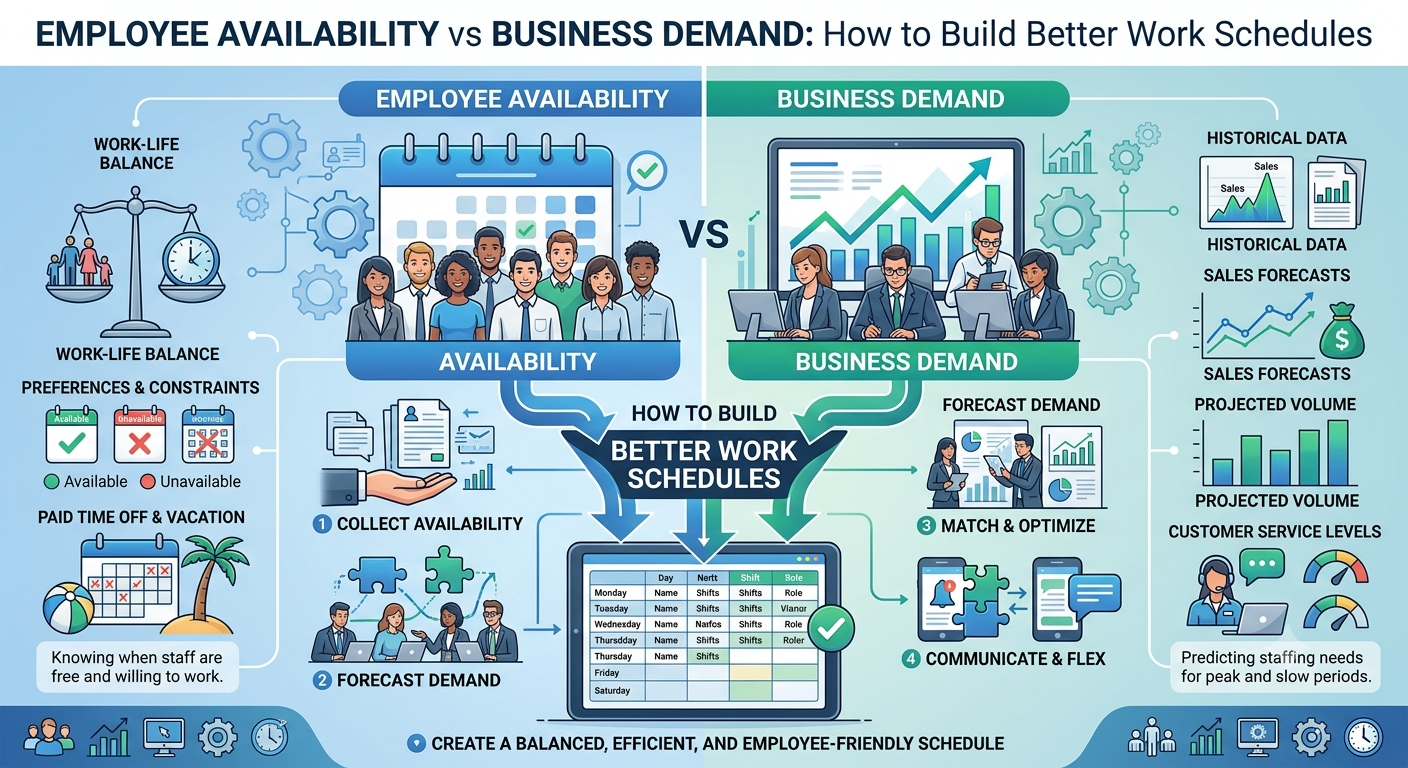
Creating an effective work schedule requires more than knowing when employees are available. Businesses also need to understand when they actually need employees. Balancing employee availability with business demand is one of the most important parts of workforce scheduling.
If managers focus only on employee availability, they may end up with too few workers during busy periods or too many employees during quiet hours. If they focus only on business demand, they may create schedules that employees cannot realistically work.
A better approach is to consider both factors together. By understanding employee availability, forecasting demand, and using a structured scheduling process, businesses can create schedules that improve coverage, control labor costs, and support a more predictable employee experience.
What Is Employee Availability?
Employee availability refers to the days and times when an employee is able to work.
Availability may include:
-
Available days
-
Preferred working hours
-
Unavailable periods
-
Maximum working hours
-
Minimum desired hours
-
Approved time off
-
Recurring commitments
-
Willingness to work additional shifts
Availability is not always the same as preference. An employee may prefer morning shifts but still be available in the afternoon.
Managers should understand this difference when building schedules. Accurate availability information gives managers more options while creating shifts.
What Is Business Demand?
Business demand refers to how much staffing is required to handle the expected workload at a particular time.
Demand can change based on:
-
Customer traffic
-
Sales volume
-
Appointments
-
Orders
-
Production requirements
-
Day of the week
-
Seasonality
-
Special events
-
Operating hours
For example, a restaurant may need more employees during lunch and dinner than during the middle of the afternoon.
Understanding these patterns helps managers determine how many employees are actually needed for each period.
Why Balancing Availability and Demand Matters
Employee availability and business demand are two different sides of scheduling.
Availability answers:
“Who can work?”
Business demand answers:
“How many people do we need, and when?”
A successful schedule brings these two factors together.
If demand is high but availability is low, managers may face staffing gaps or overtime.
If availability is high but demand is low, the business may schedule more labor hours than necessary.
The objective is to find a practical balance between employee availability and operational requirements.
1. Analyze Historical Business Demand
Before creating a schedule, managers should review historical business information.
Look at patterns such as:
-
Customer traffic
-
Sales
-
Orders
-
Appointments
-
Previous staffing levels
-
Peak hours
-
Quiet periods
-
Seasonal changes
Historical information can help managers understand when demand usually increases or decreases.
For example, if a retail business consistently receives more customers on Saturday afternoons, managers can plan additional coverage for those hours.
Demand should not be based entirely on assumptions. Using available business data can make scheduling decisions more consistent.
2. Collect Accurate Employee Availability
Managers should collect employee availability before building the schedule.
Employees should have a clear way to communicate:
-
When they can work
-
When they cannot work
-
Preferred shifts
-
Time-off requests
-
Changes to recurring availability
Availability information should be reviewed regularly.
Outdated availability can result in scheduling conflicts and last-minute changes. Keeping information current gives managers a clearer picture of their workforce.
3. Identify Required Staffing Levels
Once demand is understood, determine how many employees are needed during each period.
Consider both quantity and skills.
For example, a business may need six employees during a busy period, but those employees may need to include a supervisor and workers with specific skills.
Create staffing requirements for:
-
Low-demand periods
-
Normal periods
-
Peak periods
-
Special events
-
Seasonal periods
This provides managers with a clear framework for building schedules.
4. Match Available Employees With Demand
The next step is to match employee availability with business requirements.
Start with shifts that are most important or difficult to cover.
Then assign employees based on:
-
Availability
-
Skills
-
Experience
-
Location
-
Working-hour limits
-
Business requirements
This approach helps managers avoid filling easy shifts first and discovering later that difficult shifts remain uncovered.
5. Monitor Employee Working Hours
A schedule should not only consider availability. Managers should also monitor how many hours each employee is already working.
Before assigning an additional shift, check:
-
Hours already scheduled
-
Hours already worked
-
Remaining availability
-
Potential overtime
-
Required rest periods
Distributing hours carefully can help prevent unnecessary overtime.
Some overtime may be required during busy periods or emergencies, but managers should identify alternative coverage options whenever practical.
6. Plan for Unexpected Changes
Even a carefully prepared schedule can change.
Employees may call off sick, request emergency leave, or become unavailable. Business demand can also increase unexpectedly.
Managers should create backup options before these situations happen.
Possible options include:
-
Cross-trained employees
-
Open shifts
-
Part-time workers
-
Employees willing to pick up additional shifts
-
Qualified workers from another location
A backup plan reduces the pressure on managers when an unexpected staffing problem occurs.
7. Use Technology to Compare Availability and Demand
Managing employee availability and business demand manually can become difficult as a workforce grows.
Employee Scheduling software can help managers organize employee availability, schedules, working hours, and staffing requirements in one place. Depending on the platform, it may also help identify potential coverage gaps and manage schedule changes.
Centralized information allows managers to make scheduling decisions using more complete workforce information rather than relying on separate spreadsheets or messages.
8. Build Schedules Around Peak Periods
Not every hour requires the same number of employees.
Managers should identify periods when business demand is highest and prioritize coverage during those times.
For example:
Low demand: Schedule essential coverage.
Normal demand: Maintain standard staffing.
High demand: Add employees or increase coverage.
This approach helps businesses place labor where it has the greatest operational value.
It can also prevent employees from becoming overloaded during busy periods.
9. Create Clear Rules for Shift Changes
Employee availability can change after a schedule has been published.
Businesses should have clear procedures for:
-
Shift swaps
-
Open shifts
-
Time-off requests
-
Availability changes
-
Emergency absences
Before approving a change, managers should check whether it affects coverage or overtime.
A structured process gives employees flexibility while helping managers maintain control of staffing levels.
10. Use Scheduling Technology as Your Business Grows
As employee numbers increase, managing schedules manually can become time-consuming.
Shift scheduling software can help organize shifts, employee availability, working hours, and coverage information.
Depending on the solution, managers may be able to create schedules, identify open shifts, manage changes, and communicate schedule updates more efficiently.
Technology can be particularly useful for businesses with multiple teams or locations because managers can maintain better visibility across the workforce.
11. Review Schedule Performance
A schedule should be reviewed after the working period ends.
Managers can compare planned staffing with actual results.
Useful metrics include:
-
Overtime hours
-
Staffing gaps
-
Uncovered shifts
-
Schedule changes
-
Actual hours worked
-
Labor costs
-
Absence coverage
For example, if a particular shift repeatedly requires emergency coverage, managers can investigate whether employee availability or staffing requirements need to change.
Regular reviews help businesses improve future schedules.
Common Scheduling Mistakes to Avoid
Focusing Only on Employee Availability
A schedule should reflect business demand as well as employee availability.
Ignoring Demand Patterns
Using the same staffing level throughout the day can create overstaffing and understaffing.
Not Updating Availability
Outdated employee information can cause unnecessary scheduling conflicts.
Ignoring Employee Skills
Availability alone does not mean an employee is suitable for every role.
Failing to Monitor Hours
Additional shifts can create unnecessary overtime if total working hours are not reviewed.
Not Having Backup Coverage
Unexpected absences can quickly create staffing gaps without a backup plan.
A Simple Process for Building Better Work Schedules
Managers can follow these steps:
-
Review historical business demand.
-
Identify upcoming busy and quiet periods.
-
Collect updated employee availability.
-
Determine required staffing levels.
-
Identify required skills for each shift.
-
Match available employees with business needs.
-
Check employee working hours.
-
Identify potential overtime.
-
Prepare backup coverage.
-
Publish the schedule in advance.
-
Monitor schedule changes.
-
Review results and improve future schedules.
Following a consistent process can make scheduling easier and more predictable.
Final Thoughts
Balancing employee availability with business demand is essential for creating effective work schedules. Businesses need to consider both when employees can work and when their workforce is actually needed.
By analyzing demand, keeping availability information accurate, matching employees with appropriate shifts, and monitoring working hours, managers can improve coverage and reduce unnecessary labor costs.
Technology can make this process easier by centralizing schedules, availability, working hours, and staffing information.
The goal is not to create a perfect schedule that never changes. Instead, businesses should create a flexible scheduling process that can respond to changing employee availability and business demand.
When managers regularly review scheduling results and adjust future plans based on real operational patterns, they can build a workforce that is better aligned with customer demand while providing employees with greater schedule visibility and predictability.

 English
 French
 Spanish
 Portuguese
 Deutsch
 Turkish
 Dutch
Dutch
 Italiano
 Russian
 Romaian
 Portuguese (Brazil)
 Greek
Greek